Posts

New Windows Phone "Registry Tool" and "Capability Unlock" Introduce by "Amol Baikar" on XDA Forum.
Image
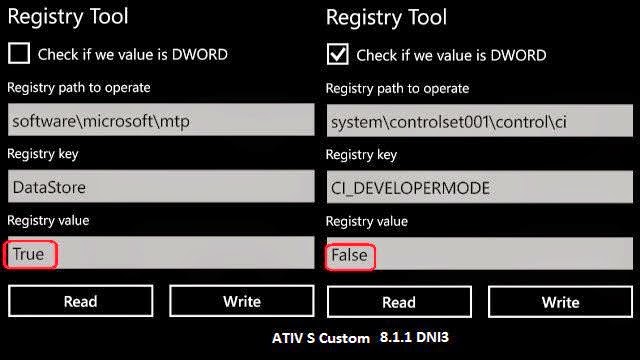
Hello, my self Aditya. New Windows Phone "Registry Tool" and "Capability Unlock" introduce by @ djamol  at " XDA-Developers " Forum. Here is the details, what he wrote in the Forum Post. Hi folk's, Previously i have described that the how to unlock " WPSystem " root directory on SD Card. So I've found a two little hack that can be exploits some cool things. I'm giving an explanation with the simple example. Achievement first :-  There is a possibility to run any app package in any Program directory. Can be possible run homebrew app in second party and first party directory. Important thing is that app run's with the reserved capabilies of the targeted directory. Such as "SECOND PARTY APPLICATION" capabilities and "FIRST PARTY APPLICATION" capabilities. For an example. [ID_CAP_INTEROPSERVICES] So how to get it work on.? There is a very simple approach. We will take an example of the OEM APPLI...

How to dump OEM Specific System Apps or move it on SD Card.

Image
I apologise if you all know this methods. But this post would helpful for those, 1. Which peoples requests a lot's of time Dycrypted .XAP for research or any use. 2. For which peoples, that they can't download whole .FFU file and known methods for to extract the .FFU 3. Very Useful to research on latest version of .XAP 4. For Any reason. If you have already Installed System Apps on Phone storage then follow Step "A", otherwise go to step "B". Step A :- Uninstall Pre-Install System Apps. 1. Set your Phone "DATE" to over the year 2200 or more. 2. Then open the "SETTINGS". 3. choose the app which you want to delete and try to launch it. You will get two pop-menu. ("Uninstall" and "Buy") 4. Uninstall. 5. Set Phone date back to the regular. 6. Done. Step B :-  1. Go to the "STORAGE SENSE". 2. Set Application Installation media to "SD Card". 3. Now Install the application, it wi...

Free Download Windows 10 Technical Preview

Image
Follow these steps to download Technical Preview: Sign up for the Windows Insider Program . Read the System Requirements . Click one of the Download links on this page to download a special file—it's called an ISO file—that you can use to install the preview. When the download is complete, transfer the ISO file to installation media such as a DVD or USB flash drive. Double-tap or double-click setup.exe from the installation media, and then follow the steps. Product Key : NKJFK-GPHP7-G8C3J-P6JXR-HQRJR Download links :- English 64-bit (x64) Download (3.81 GB) English 32-bit (x86) Download (2.93 GB)  English (United Kingdom) 64-bit (x64) Download (3.79 GB) English (United Kingdom) 32-bit (x86) Download (2.94 GB) Chinese (Simplified) 64-bit (x64) Download (3.96 GB) Chinese (Simplified) 32-bit (x86) Download (3.05 GB) Portuguese (Brazil) 64-bit (x64) Download (3.76 GB) Portuguese (Brazil) 32-bit (x86) Download (2.91 GB) Enjoy !!! Don...

UC Browser updated with New Cooler UI

Image
UC Browser updated with New Cool User Interface. Fast and smooth tab experience. Now Address bar and Search bar are merged in latest update. Improved bug fixes and speed performance. Here is the changelog to Version  4.0.0.455 Redesigned user interface for a better visual experience Richer site navigation Merged Address Bar and Search Box Better Tab Management (for WP devices with at least 1GB RAM) 1) #1 mobile browser on the WP Store. 2) 100% FREE, Super FAST and SMOOTH. 3) Best Windows Phone Browser of 2014 About.com Readers' Choice Award. 4) Brand New UI What's new for 4.0? 1. New Cooler UI Totally new speed dial with a cooler UI. 2. Richer Site Navigation Beautiful graphics make it easier to find the latest hot sites. 3. Merged Address Bar and Search Box Offers you a more intelligent input experience. 4. Better Tab Switching More intuitive gesture control for switching tabs. Features: ★ Cool and Sleek UI Totally new speed dial and ...

Microsoft now rolling out Windows Phone 8.1 Update 1 for Nokia Lumia 930

Image
"Microsoft" has announced that the rolling out a new software (OS) update for the Nokia Lumia 930 Device, bringing the firmware revision number up to .14353 (from .14252) and the OS is now .14157, which is the same as the current Preview for Developers program. For those who may recall, OS .14157 is the Windows Phone 8.1 Update 1, meaning users do not need to be enrolled in the Developer Preview Program. Besides the HTC One for Windows Phone on Verizon, this is the first official, non-preview phone to get Update 1. Lumia 930 14353 and 8.1.1 changes Improved stability & performance. Imaging enhancements. Enriched display performance. Cortana support added for UK and China. Start screen folders, customizable snooze for alarm clock and other usability improvements Please note that, this is still the " Lumia Cyan " Update 1, and it is not a " Lumia Denim Firmware " Update. If do you have the Nokia Lumia 930 then check for the update ...

How to share your cellular data connection over Bluetooth

Image
To use the shared data connection over Bluetooth, the device you're using must support the Bluetooth Personal Area Network User (PANU) role. To find out if your Bluetooth device supports this, check the documentation that came with it or check the manufacturer's website. To learn more about Bluetooth personal area networks (PAN) in general, check out the Microsoft Windows website . Pair your phone with the Bluetooth device and connect to it over Bluetooth. In the App list, tap Settings  > Internet sharing. Tap Share over, and then tap Bluetooth. Set Sharing to On. You can also start sharing over Bluetooth even when Sharing is turned off. Just connect your device to your phone over Bluetooth, and then Sharing will turn on automatically. Tip Trying to decide which connection to share over? First, it depends on the device and whether it lets you connect to a shared connection over Wi-Fi or Bluetooth. If it lets you choose either type of connection, con...

Changing Start menu colors in Windows 9

Image
Information leak about what may be included in the next version of "Windows Operating System", code name "Threshold" has been leaked. Above leaked screenshot's shows that it's "Start Menu" may change colors which based on the background theme selected by the "User" for the Operating System. This screenshot's posted on "PCportal.org.ru" website and would seem to indicate "Microsoft" will offer some small but still pretty customization option's for the returning "Start Menu" in Threshold, which "may" or "may not" be called Windows 9 when it is released.. Note that the if these images are accurate, Microsoft could still remove this feature before the final version of Threshold goes live. In additional, long time Microsoft watcher "Paul Thurrott" has a few more new tidbits about Threshold in a new article, based on what looks like first hand knowledge of an early build...